Google will make an OS based on chrome - the currently refer to it as Chrome OS - they should name it "chromeOSome" or "chromeOSome G".
Thursday, July 09, 2009

Saturday, April 11, 2009
Google AppEngine (GAE) is case sensitive and my XP is not
I was just about to post the following "complaint"/request for help to the google appengine newsgroup:
Hi,
I created a GAE application using python.
well - that might be an overstatement, as this app is just a plain static html/js/css website.
It took a while to get it running on my dev environment but finally it does work.
I executed the update script and it seems to run o.k.
D:\DVLP\Dozi>"C:\program Files\Google\google_appengine/appcfg.py" update d:\dvlp\dozi
Scanning files on local disk.
Initiating update.
Cloning 111 static files.
Cloned 100 files.
Cloning 12 application files.
Uploading 2 files.
Deploying new version.
Checking if new version is ready to serve.
Will check again in 1 seconds.
Checking if new version is ready to serve.
Closing update: new version is ready to start serving.
Uploading index definitions.
and I even see it on my console as uploaded.
BUT - when i try to go to any of
http://dozi-arch.appspot.com
https://dozi-arch.appspot.com
http://ppp.doritz.com
http://2.latest.dozi-arch.appspot.com
which to my understanding should all lead to a working version of this site I only get a page saying
"Oops! This link appears broken." (404)
if i try accessing an image on this site:
e.g.
http://dozi-arch.appspot.com/img/leaves.jpg
it is properly served.
my app.yaml looks like this:
No, you are not missing the end.
it was at that point that I said to myself - well, if it servers the image - why wont it serve the .htm ??
the app.yaml looks like this:
application: dozi-arch
version: 2
runtime: python
api_version: 1

default_expiration: "1m"

skip_files:
- ^(.*/)?app\.yaml
- ^(.*/)?app\.yml
- ^(.*/)?index\.yaml
- ^(.*/)?index\.yml
- ^(.*/)?#.*#
- ^(.*/)?.*~
- ^(.*/)?.*\.py[co]
- ^(.*/)?.*/RCS/.*
- ^(.*/)?\..*
- ^(.*/)?.*\.bak$
- ^(.*/)?.*\.sln$
- ^(.*/)?.*\.suo$
- ^(.*/)?.*\.txt$
- ^(.*/)?.*\.bat$
- ^(.*/)?Thumbs.db$


handlers:
- url: /
  static_files: static/default.htm
  upload: static/default.htm

# All URLs beginning with /img are treated as paths to static files in
# the img/ directory.  Note that static_dir handlers do not use a
# regular expression for the URL pattern, only a prefix.

- url: /(.*)
  static_files: static/\1
  upload: static/(.*)
so why won't it serve default.htm when I go to the root of my site ?
well as it turns out - it because the file is locally stored as Default.htm not default.htm - when running on my pc the filesystem does not care for case and serves it even when asked for default.htm.
changed app.yaml to say:
- url: /
  static_files: static/Default.htm
  upload: static/Default.htm
and ....
Shazam...!!!!!
b.t.w -
does anyone know how can i server a url such as
http://example.com/שם_בעברית.htm
as a file from GAE ?! (for the non-hebrew-speakers among you - the file name just say "a name in hebrew".
well - maybe when i have another free night to bang my head against the GAE.
Monday, March 30, 2009
wrong or missing querystring parameters when the url of the swf gets redirected (302)
A bug we just found with the IE flash player:
When you load a swf from a URL that does not return the actual swf but responds with a redirect (302) to another URL where the actual swf is, the swf is loaded but paramters from the querystring of the redirected-to URL are not available to the swf.
i.e.
if you go try to load a swf from "http://mydomain.com/path/redirect?swfid=123"
when redirects to "http://swfhosting.com/pathtoswf/myswf.swf?param=val¶m2=val2"
The swf will load but will not be able to access "param" or "param2" as you might expect.
instead it will be able to see "swfid".
note: This does not happen with the FF flash plugin.
feel free to vote for fixing this bug and another one which seems related:
https://bugs.adobe.com/jira/browse/FP-1823
https://bugs.adobe.com/jira/browse/FP-1612
Wednesday, September 03, 2008
My Test Drive of Google Chrome
When I told my wife that google has entered the browser arena with a new browser named "Google Chrome" her first Q was "so, is it in hebrew ?"
I told her that knowing google, it is either already in hebrew or will have hebrew in a short time.
well sure enough, after a quick install (no more then 2 min. I estimate) chrome was running on my machine - In hebrew of course.
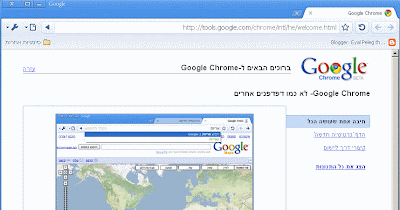
well - it looks different. has the googleish lightweight feel.
SEARCHBOX
first thing to I noticed was the search box - I started typing in it and got a bunch of suggestions for auto compleate - taken from my favorites, from what looks like google suggest and some other trivail domain compleations - not bad at all.
SPEED
second thing I noticed was that the site I asked for opened very quickly (probably has to do with a setting I later found they have for early dns resolution).
Dragable TABS
second thing I noticed was the tabs - well... being a developer with an itch for boundary scenarios I started adding new tabs, well other then the text being reduced to ...'s and then just to empty tabs (which still show the title as a tooltip) it handled my 30 or so tabs without any problem.
but hey I can't see the tab names so I tried to see if I could trag some of them to a "second row" of tabs - well my intuition was partly right - they did drag out but not to a second row but rather to a second window. dragging the tabs also works as you would expect between the new windows.
Processes
A quick look at the tasklist shows now 5 chrome.exe proccess - probably one that is somehow common + an additional procces for each tab that actually has content.
NO CRASHES - so far..
Blooger works
Well this blog post is being edited and posted via chrome.
For Developers
Google chrome has several nice features for developers
Javascript Console & Debugger
Google chrome comes with a built in javascript console and a javascript debugger which I will most definately have to take a look at.
a nice "View source" feature with color syntax
a cool internal task list
The internal task list (shift+Esc) lets you see exactly each of your tabs
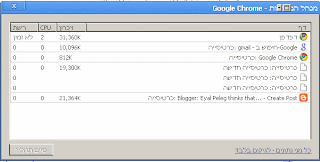
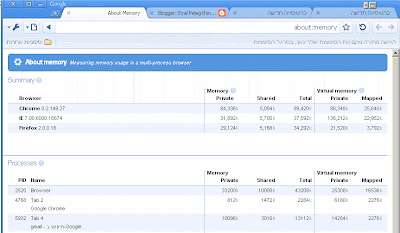
an advanced "geek only" view shows also is taking how much memory resources (and also compare chromes memory usage to that of IE or FF)
What seems to be missing
Hey hmm.. pssst.. google people....
anybody knows how I can install my google toolbar on my google browser ????
(a quick search of the internet shows I am not the only one asking this ...).
as a web developer I can't no wander what trouble awaits for me trying to customize stuff to also look good also on chrome now. (think of all the web pages that have code that says "if its IE then else if its FF then else who cares.... - well here is another if for all of us).
well, here goes my first post via chrome - first test drive - no crashes at all.
Sunday, June 29, 2008
Two Tips For Debugging Flash Warnings
If you develop Flash widgets or application you might (and should) be familiar with the flash log.
One of the biggest issues with this log is that all the warnings and trace messages just pile up there regardless of what swf sent them.
Here are two simple tips to trace the "Warning: name is not a function" messages:
1. The reason you get those is because you are trying to call a function on some variable does not have such a function in its prototype chain.
2. To be able to identify what line in your code is causing those messages you can force the player to write out "Comments" into the log using the following syntax:
({}).THIS_IS_A_COMMENT_TO_THE_LOG()
This will trigget the same type of warning and so by placing several distinct such comments you can narrow the search and find the code line at fault.
Subscribe to:
Posts (Atom)


