Showing posts with label google. Show all posts

Thursday, August 13, 2009

DNS problem with gmail (404) - possible dns poisoning

Yesterday I had the weirdest phenomenon, my gmail stopped working.
It just returned a 404 error (page not found).

Why do I say it was weird ?

  • Because it happened only on one of the computers in my network, while the other machine had no problems getting to gmail.

  • Because it happened on both IE and FF so it did not seem to result from a browser specific issue.

  • Because it only effected gmail but on the same machine I had no problem accessing any other web site including other google services such as calendar.

  • Because pinging to gmail.com or mail.google.com or googlemail.l.google.com all returned addresses that seemed to be valid google IPs.

  • Because when using IE to try and get to gmail.com I got a windows authentication dialog (and I really don't think gmail is running on windows based machines).

  • Because it turned out that it was actually trying to access the local web server on my machine and when I configured it to return a page when asked for /mail it did return that page.

  • Because at some point a ping to gmail.com started returning 127.0.0.1 (localhost).

  • Because this happened at the same day to a friend that was running Vista. (we do have both linksys routers and use the same internet provider.)


Eventually this was fixed by calling ipconfig /flushdns - I guess a restart could also do the trick.

Why and how did this happen - I have no idea.

Has anyone else encountered such strange behavior ?

Saturday, April 11, 2009

Google AppEngine (GAE) is case sensitive and my XP is not

I was just about to post the following "complaint"/request for help to the google appengine newsgroup:

Hi,
I created a GAE application using python.
well - that might be an overstatement, as this app is just a plain static html/js/css website.

It took a while to get it running on my dev environment but finally it does work.

I executed the update script and it seems to run o.k.

D:\DVLP\Dozi>"C:\program Files\Google\google_appengine/appcfg.py" update d:\dvlp\dozi
Scanning files on local disk.
Initiating update.
Cloning 111 static files.
Cloned 100 files.
Cloning 12 application files.
Uploading 2 files.
Deploying new version.
Checking if new version is ready to serve.
Will check again in 1 seconds.
Checking if new version is ready to serve.
Closing update: new version is ready to start serving.
Uploading index definitions.

and I even see it on my console as uploaded.

BUT - when i try to go to any of

http://dozi-arch.appspot.com
https://dozi-arch.appspot.com
http://ppp.doritz.com
http://2.latest.dozi-arch.appspot.com

which to my understanding should all lead to a working version of this site I only get a page saying
"Oops! This link appears broken." (404)

if i try accessing an image on this site:
e.g.
http://dozi-arch.appspot.com/img/leaves.jpg
it is properly served.


my app.yaml looks like this:


No, you are not missing the end.
it was at that point that I said to myself - well, if it servers the image - why wont it serve the .htm ??

the app.yaml looks like this:


application: dozi-arch
version: 2
runtime: python
api_version: 1

default_expiration: "1m"

skip_files:
- ^(.*/)?app\.yaml
- ^(.*/)?app\.yml
- ^(.*/)?index\.yaml
- ^(.*/)?index\.yml
- ^(.*/)?#.*#
- ^(.*/)?.*~
- ^(.*/)?.*\.py[co]
- ^(.*/)?.*/RCS/.*
- ^(.*/)?\..*
- ^(.*/)?.*\.bak$
- ^(.*/)?.*\.sln$
- ^(.*/)?.*\.suo$
- ^(.*/)?.*\.txt$
- ^(.*/)?.*\.bat$
- ^(.*/)?Thumbs.db$


handlers:
- url: /
static_files: static/default.htm
upload: static/default.htm

# All URLs beginning with /img are treated as paths to static files in
# the img/ directory. Note that static_dir handlers do not use a
# regular expression for the URL pattern, only a prefix.

- url: /(.*)
static_files: static/\1
upload: static/(.*)


so why won't it serve default.htm when I go to the root of my site ?

well as it turns out - it because the file is locally stored as Default.htm not default.htm - when running on my pc the filesystem does not care for case and serves it even when asked for default.htm.

changed app.yaml to say:

- url: /
static_files: static/Default.htm
upload: static/Default.htm


and ....
Shazam...!!!!!

b.t.w -
does anyone know how can i server a url such as
http://example.com/שם_בעברית.htm
as a file from GAE ?! (for the non-hebrew-speakers among you - the file name just say "a name in hebrew".

well - maybe when i have another free night to bang my head against the GAE.

Wednesday, September 03, 2008

My Test Drive of Google Chrome

When I told my wife that google has entered the browser arena with a new browser named "Google Chrome" her first Q was "so, is it in hebrew ?"

I told her that knowing google, it is either already in hebrew or will have hebrew in a short time.

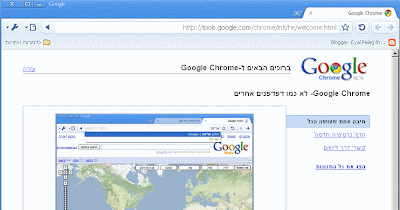
well sure enough, after a quick install (no more then 2 min. I estimate) chrome was running  on my machine - In hebrew of course.


well - it looks different. has the googleish lightweight feel.

SEARCHBOX
first thing to I noticed was the search box - I started typing in it and got a bunch of suggestions for auto compleate - taken from my favorites, from what looks like google suggest and some other trivail domain compleations - not bad at all.

SPEED
second thing I noticed was that the site I asked for opened very quickly (probably has to do with a setting I later found they have for early dns resolution).

Dragable TABS
second thing I noticed was the tabs - well... being a developer with an itch for boundary scenarios I started adding new tabs, well other then the text being reduced to ...'s and then just to empty tabs (which still show the title as a tooltip) it handled my 30 or so tabs without any problem.
but hey I can't see the tab names so I tried to see if I could trag some of them to a "second row" of tabs - well my intuition was partly right - they did drag out but not to a second row but rather to a second window. dragging the tabs also works as you would expect between the new windows.

Processes
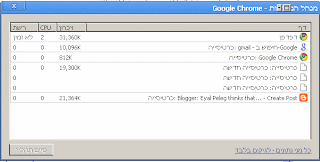
A quick look at the tasklist shows now 5 chrome.exe proccess - probably one that is somehow common + an additional procces for each tab that actually has content.

NO CRASHES - so far..

Blooger works
Well this blog post is being edited and posted via chrome.

For Developers

Google chrome has several nice features for developers

Javascript Console & Debugger
Google chrome comes with a built in javascript console and a javascript debugger which I will most definately have to take a look at.

a nice "View source" feature with color syntax

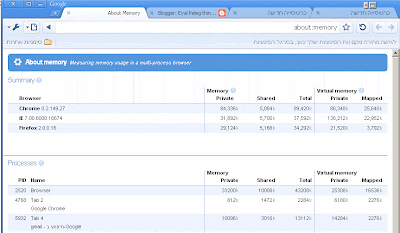
a cool internal task list
The internal task list (shift+Esc)  lets you see exactly each of your tabs 


an advanced "geek only" view shows also  is taking how much memory  resources (and also compare chromes memory usage to that of IE or FF)


What seems to be missing
Hey hmm.. pssst..  google people....
anybody knows how I can install my google toolbar on my google browser ????
(a quick search of the internet shows I am not the only one asking this ...).


as a web developer I can't no wander what trouble awaits for me trying to customize stuff to also look good also on chrome now. (think of all the web pages that have code that says "if its IE then else if its FF then else who cares.... - well here is another if for all of us).

well, here goes my first post via chrome - first test drive - no crashes at all.


Clicky Web Analytics